
Requests, prescriptions and documents through a secure route instead of WhatsApp
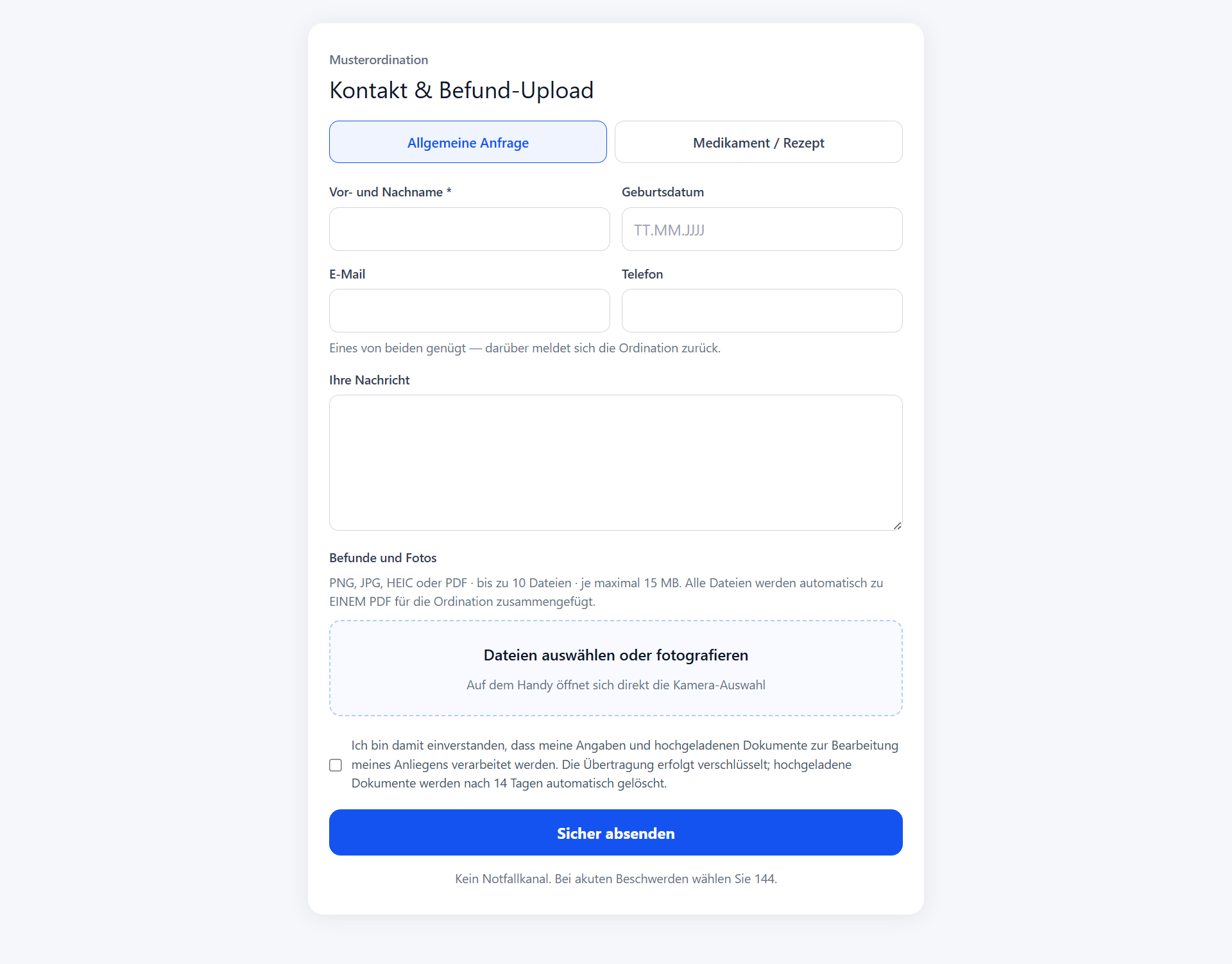
Your patients need no second channel and no app: they fill in a short form, photograph their document if needed and send both to your practice encrypted. You get everything bundled as a single PDF, on its own page or as a widget directly on your existing website.
What is behind it
01
Two requests, one form
One tab for the general enquiry, one for medication and prescriptions. You decide whether you offer both and whether file upload is possible at all.
02
A widget on any website
A single script tag is enough, whether WordPress, Wix, Jimdo, TYPO3 or hand written. A button appears that opens the form in an isolated window. You define what it is called, what colour it has, which page it sits on and which tab opens first: a "order a prescription" button opens the prescription form directly.
03
Everything arrives as one PDF
Up to 10 files (PNG, JPG, HEIC or PDF, each up to 15 MB, which are the defaults and adjustable for your practice) are merged automatically into ONE PDF. Your team opens one file instead of going through seven phone photos one by one.
04
A deletion period that really deletes
Uploaded documents are deleted automatically after 14 days by default, both the merged PDF and the original files. Anything that could not be deleted is not marked as deleted either, it is retried.
How it works in practice
- 1
A patient has received a lab result from a specialist. She taps "send contact and documents" on the practice website, photographs the two pages with her phone and sends them, with no app and no sign-up.
- 2
A patient needs a repeat prescription. He arrives through the "order a prescription" button, lands straight in the right tab, gives the medication and his callback number and is done in half a minute.
- 3
At the practice both arrive bundled: name, date of birth, request and a single PDF with all the pages. On request an email goes to the addresses you stored as well, so nobody has to look in the dashboard to find out.
Today and with Servus KI
Today
Medical documents arrive by WhatsApp on a private phone, by email to a shared address or are dropped off in person. Every photo sits somewhere on its own, and somebody matches it to the patient by hand.
With Servus KI
One encrypted route, one PDF, a clear deletion period, and the button for it sits where your patients already look: on your own website.
Related
Frequently asked questions
Which file formats are supported and how large may they be?
PNG, JPG, HEIC and PDF. By default up to 10 files per request with a maximum of 15 MB each. Both values can be adjusted for your practice: a radiology practice sends larger images than a family doctor.
How long are uploaded documents stored?
14 days by default, after which they are deleted automatically, both the merged PDF and the original files uploaded. The period is a data protection commitment and is therefore set up by us rather than changed by the practice itself.
Do patients need an app or a user account?
No. The form runs in the browser, on a phone too. Tapping the upload field opens the camera selection directly, so a document can be photographed and sent straight away.
How do I add the form to my existing website?
You copy one line from your dashboard, a script tag, into your website. That works with any website builder and any CMS. Alternatively you simply link the public address of your form, for example from an email or your Google business profile.
Can somebody misuse the form on another website?
The form runs in an isolated window (iframe) so that neither foreign design nor foreign scripts can reach into it. The key in the embed code is public and can do exactly one thing: open a form and submit a request. It reads nothing. You can also define on which websites the widget may run at all, and the public link can be swapped at any time if it ends up in the wrong place.
Does the form replace the emergency number?
No, and that is stated under every form: it is not an emergency channel. For acute symptoms the ambulance service (144 in Austria) still applies.
What does it cost?
Billing is per request received; depending on the package a quota is already included. Current terms are at servus-ki.com/en/pricing.